Contents
Plugin documentation
CallInEditorContainer is a simple editor utility plugin to help you manage your CallInEditor buttons. Unreal doesn’t support the regular UPROPERTY attributes and meta tags on UFUNCTIONs and therefore limits how you can display your editor action buttons in the Details panel.
CallInEditorContainer aims to address these issues by adding a button container UPROPERTY which will gather the buttons that reference it and display them within the UPROPERTY’s property row.
Create your container
To create your CallInEditor buttons container, you must first declare your container property.
UPROPERTY(VisibleAnywhere, Category="CIEContainer|SubCategory")
FCallInEditorContainer ButtonContainer;
Although the FCallInEditorContainer does not hold any data, it is prefereable to always include these properties within WITH_EDITORONLY_DATA preprocessor directives to exclude them from serialization in Shipping builds.
Adding your CallInEditor function to your container
Once you have a container UPROPERTY, you can create the UFUNCTIONs you want it to display. We use a custom metadata tags named CallInEditorContainer to specify the container property to use.
UFUNCTION(meta=(CallInEditorContainer="ButtonContainer"))
void DoAction();
You should not include the regular CallInEditor attribute, but instead use the CallInEditorContainer metadata tag. Adding CallInEditor will duplicate your button in the Details panel.
Setup your container
Once you can see your button in the Details panel under your container, you can set it up to display how and when you want using regular UPROPERTY attributes and metadata.
| Category | UPROPERTY attributes |
|---|---|
| Visibility | Attributes: VisibleAnywhere, VisibleDefaultsOnly, VisibleInstanceOnly, EditAnywhere, EditDefaultsOnly, EditInstanceOnly Metadata: EditCondition, EditConditionHides Note Visible* and Edit* attributes are equivalent. The buttons are always considered “Editable”. |
| Grouping and ordering | Attributes: Category Metadata: DisplayAfter, DisplayPriority |
Disabling and hiding your button container can also be done with the
CanEditChange(FProperty*)C++ function override.
Setup your function
You can, of course, also use the regular function attributes directly on the UFUNCTION to customize the button itself.
| Category | UFUNCTION attributes |
|---|---|
| Display | Attributes: DisplayName Metadata: Tooltip |
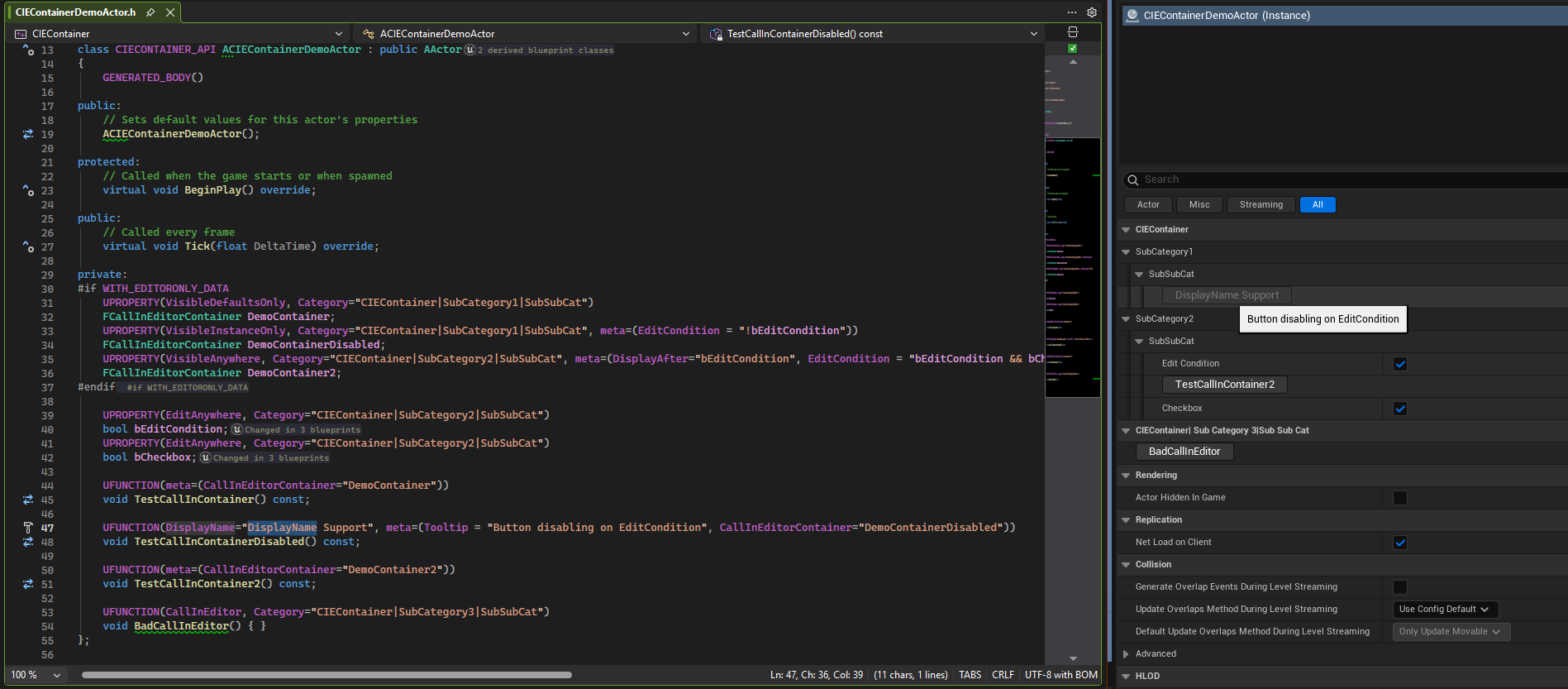
Parent class containers
CallInEditorContainer supports adding buttons to a parent class container. This means that if class A has a container named ParentContainer, you can have a UFUNCTION in class B (which subclasses A) and provide it with meta=(CallInEditor="ParentContainer") to add it to the expected container.
UCLASS()
class A : public UObject
{
  UPROPERTY(VisibleAnywhere, Category="CIEContainer|SubCategory")
  FCallInEditorContainer ParentContainer;
};

UCLASS()
class B : public A
{
  UFUNCTION(meta=(CallInEditorContainer="ParentContainer"))
  void DoAction(); // Will show within the parent container property
}
Blueprint support
In order to customize the display of your details panel buttons, CallInEditorContainer relies on C++ metadata for both your containers and functions. When dealing with blueprint, some of these metadata attributes are not exposed in the default editor. Starting with version 1.3, we added the Call In Editor Container category in the Blueprint editor to expose the supported metadata attributes on both functions and containers.
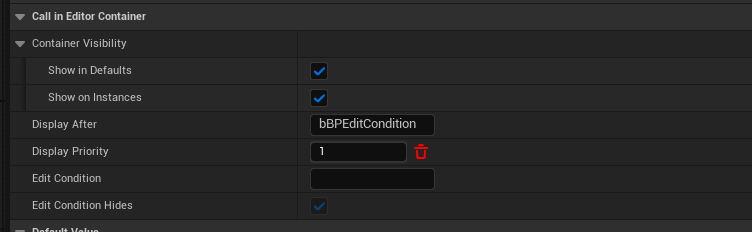
The plugin also supports metadata injection plugins like MDMetaDataEditor. However, we cannot distribute it ourselves, nor would we want to do so. Therefore, you can download it directly from their GitHub if you prefer to edit your metadata that way. All of the described features can be accessed using a Blueprint metadata editor. Special thanks to the team behind MDMetaDataEditor for their work. It was helpful in implementing our own version of metadata attributes properties.