Contents
Spawners
In the previous pages, we explained the different elements that come together to create movement in a boid. Multiple times, we mentioned the fact that some boid properties do not belong in the boid configuration data asset. Most of the time it is because the boid needs some reference to a level actor or we want them to have environment specific behavior. To do so, we can specialize our boid configuration from inside the level, through it’s spawner.
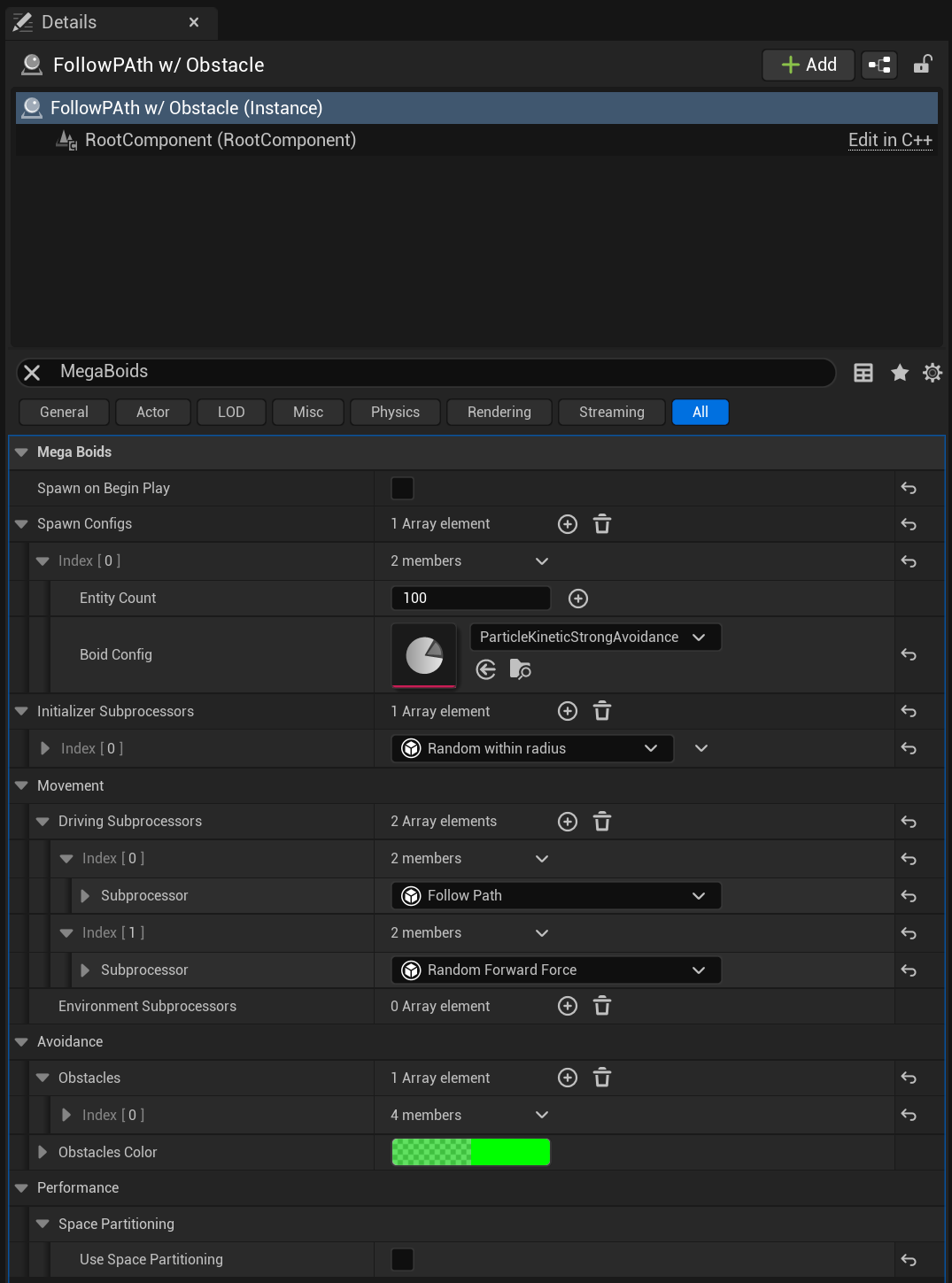
MegaBoids spawners are an actor class that you must place in your level in order to spawn a group of boids. When we spawn a batch of boids, we are actually spawning one group. Boid within a group share a set of properties for the duration of their lifetime. It includes their bounding box, an optional space partition and specialized driving subprocessors among others. The whole set of properties is listed below:
| Parameter | Description |
|---|---|
| Spawn on BeginPlay | Should it automatically spawn the group on BeginPlay? |
| Spawn configs | List of boid configurations to spawn within the group. |
| Initializer subprocessors | List of initializers used to setup the boids in the spawned groups. |
| Driving subprocessors | List of driving subprocessors to specialize the boids in the spawned groups. |
| Obstacles | List of environment obstacles used for avoidance. |
| Obstacles color | Color to render the obstacle shapes in editor. |
| Use space partitioning | Should the spawned boid groups use a space partition? More details below |
Groups
The first thing to know about groups is that they are all independent from each other even if originating from the same spawner. Every time you spawn a group, it will live in it’s own bubble without knowledge and communication with other groups. This is a conscious decision we made that allows us to achieve better multi-threading performance since we can process groups in parallel tasks. Groups also share common data like obstacles and having this data confined only to the boids who use it also reduces the required processing. It appears limiting at first, but it’s really not when you consider composition. We also don’t expect a large number of groups to be active at any given time. Let us know if you come to different conclusions or have different needs.
Group Composition
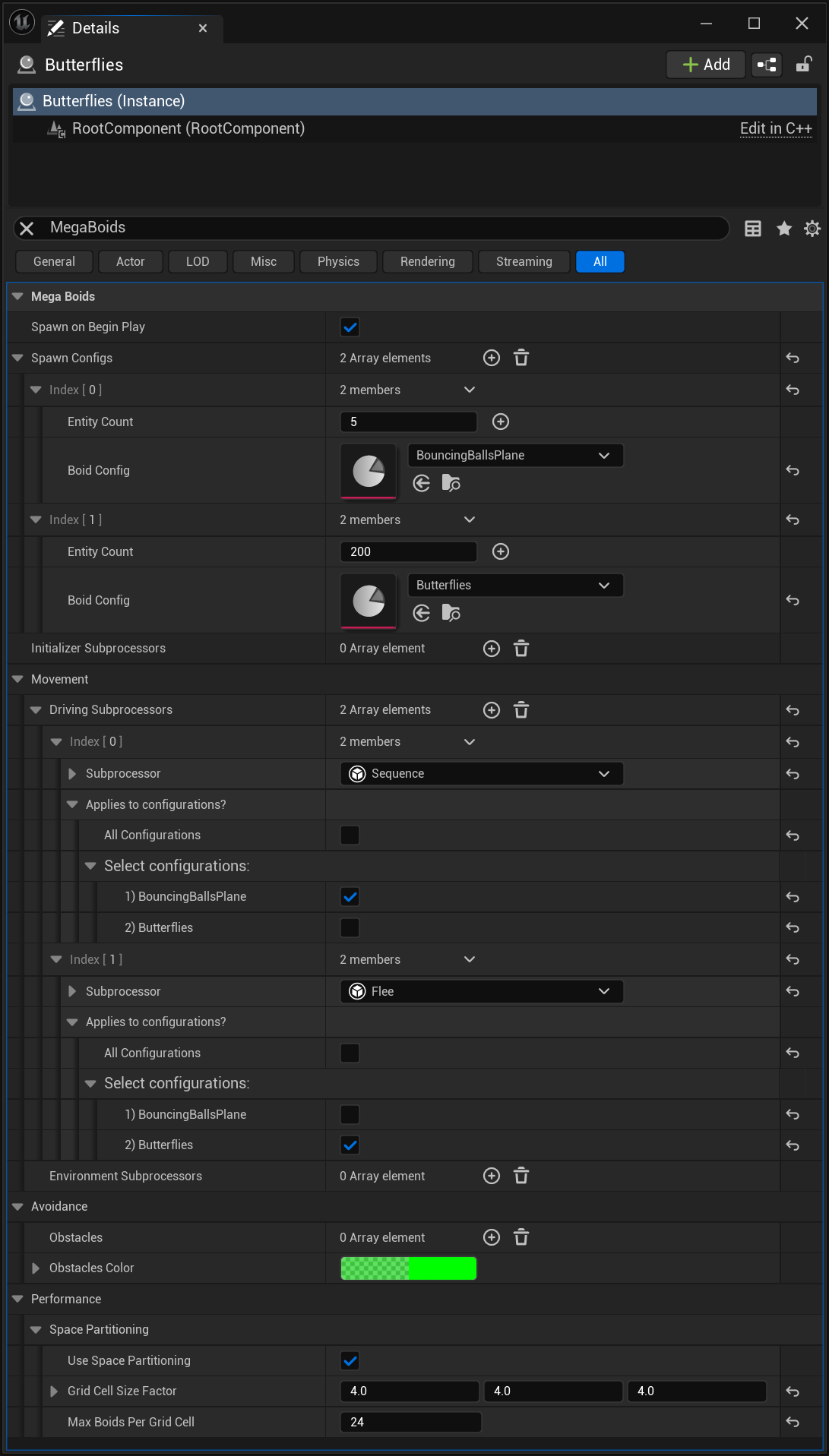
At this point, you possibly think that the spawner takes a boid configuration and spawns a batch using that template, straps a few extras on and we’re good. Although not far from the truth, the spawner has an extra trick up its sleeve: it can create boid subgroups of the same or a different configuration. This opens up so many possibilities for complex behaviors, some of which we already touched on in the anatomy page. Keeping in mind that there is no interaction between groups, the spawner allows group composition and entities within a group can interact. This means you can actually have cool designs like a hundred small fish roaming around a pool of shark or different personalities for a entities within a clowder of cats. Coupled with different representations per boid configuration, you can achieve incredibly realistic results.
[!Note] When compositing boids of vastly different sizes, that larger boids automatically ignore the “considerably” smaller ones. Just like a dragon won’t budge for a goblin, your boids will behave organically!
Space partition
Space partitioning is a technique commonly used in video games to improve performance. Many operations in a game AI require to search the surroundings to find entities near you. Boids do this extensively when searching for their neighbors in order to compute basic steering forces. When we deal with thousands of entities, it means each boid needs to compute the distance with every other boid in the group, making for millions of operations. Partitioning the 3D space in cells allows us to only consider the boids in cells near our position and therefore making it manageable.
The cell grid is a good optimization, but can only help so much when all entities are tightly packed. A further improvement available is that we can limit the number of boids in each cell. If a cell contains more than the specified number of boids, some of them will simply be ignored from the steering calculations, or any other neighbor range search in your custom driving or movement subprocesors. Of course, it comes with an impact on the separation part of steering especially since boids can’t separate from neighbors which are not tracked in the space partition. Cohesion and alignment aren’t impacted as much since past a certain threshold, each boid’s impact becomes fairly small. Finding the right balance is key here.
The space partition currently comes in two flavors: a dense cell grid and an spatial hash grid.
- Dense cell grid: The dense cell grid allocates memory space for all possible entities within the space partition at spawn. This implementation makes it use a fair bit of memory but is also the most efficient for traversal since it can go through neighbor cells linearly with high memory locality. It is appropriate for groups that occupy most of the spawner’s area most of the time.
- Spatial hash grid: The spatial hash grid uses a pool of dynamically allocated cells to reduce memory usage. However, there is a performance penalty to finding cells when doing a neighbor search since we need to compute each cell’s “hash” value and find it using a binary search within the allocated cells. Nevertheless, it is the right option when dealing with large areas to reduce memory usage.
- You can also forego space partition if required although the use-cases for such a setup are limited to groups with very few individuals as the performance for just a few hundred boids is abysmal without a space partition.
When used with multiple boid configurations in a group, each configuration/subgroup will have it’s own space partition within an aggregate group partition but will execute it’s neighbor search among all partitions available for the group as long as the boid size is relevant (Steering, for instance, ignores “significantly” smaller boids).
Space Partition Settings
| Parameter | Description |
|---|---|
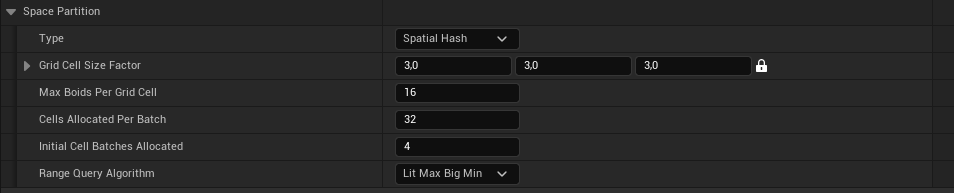
| Type | The type of space partition to use. None: No space partition. Not recomended except for very small quantities of boids (typically under 50). Dense 3D Cell Grid: A dense 3D cell grid with all cells memory preallocated. Very fast access for range queries but uses a lot of memory when used for large areas. Spatial Hash: A Morton Index based spatial hash grid. Slightly slower range queries (~30-40%) and some overhead when moving boids between cells but limited memory use. Preferable for large areas with a lot of empty space to reduce memory usage. |
| Grid Cell Size Factor | Multiplier on the size and view distance of the boid to use for the space partition grid cell sizes. Space partition cells will end up with a size of ‘Boid Size * View Distance Factor * Grid Cell Size Factor’. |
| Max Boids per Grid Cell | The maximum number of boids tracked in a cell. When the cell this amount of boids, new boids entering it will simply be left out. They can therefore get information about their neighbors but are “invisible” to them. This can however provide a significant boost in performance with minimal impact on the simulation. |
| Cells Allocated Per Batch | When using Spatial Hash, the number of cells that are allocated per batch, when new cells are required. Needs to be a multiple of 4. |
| Initial Cell Batches Allocated | When using Spatial Hash, the number of batches that are initially allocated when spawning the boids. Ideally this initial allocation would cover your needs to prevent allocating during the boids lifetime. |
| Range Query Algorithm | The range query algorithm to use. Default: The default, most common alogortihm determined by us (currently LitMax/BigMin). Morton Linear: Linearly traverse Morton indices between the firrst and last cell within range. This can be slow if the areas are large and sparsely occupied. LitMax/BigMin: “Binary search” range query based on the LitMax-BigMin algorithm. Typically faster than Morton Linear, especially for large and sparsely occupied areas. |
Space Partition Settings Chain
Because different boids and environments have different requirements, we introduced a chain of space partition settings to make configuring your space partitions versatile, fast and easy. The chain of settings goes like this:
- In the Project Settings page, under MegaBoids, you will find the default project space partition. If no other override is set further down the chain, this is the value that will be used.
- After the project default, you can set a default per boid configuration in the boid config data asset. All boids spawned with the configuration will use the specified space partition if overridden at this level.
- Next, you can also override the partition settings at the spawner level. Here, you can override the space partition for all configurations in the spawner with a single settings, overriding both the project and configuration settings. This is useful to optimize the space partition for the environment in which it spawns.
- Finally, still on the spawner, you can
- set the space partition settings for each spawn configuration independently, similarly to the applicability of the driving subprocessors in the spawner. This is the ultimate level of specialization. Overriding the space partition at this level ignores all previous settings.